
Chronological Age Calculator Tools, Browser Extensions & Downloads
Find the right way to calculate chronological age. Explore our browser extensions, Android app, free online calculators, and helpful resources, all in one place.




Why Choose Our Chronological Age Calculator Tools?
We believe calculating age should be simple, quick, and accessible to everyone. Our tools are designed to help you get clear, reliable results without complicated steps or unnecessary calculations.
Easy to Use
Enter the required dates and get your results in just a few clicks. No complicated calculations or technical knowledge needed.
Free to Access
Use our online calculators and explore our downloadable resources without paying for basic functionality.
Instant Results
Get your results in seconds without working through lengthy manual calculations.
Flexible Options
Calculate age using a custom reference date or explore spreadsheet templates for calculations that fit your workflow.
Useful for Different Needs
Whether you’re checking your own age, organizing records, or working with date-based information, our tools offer a convenient starting point.
What Is a Browser Extension?
A browser extension is a small software add-on that adds extra features to your web browser. It can help you perform specific tasks, access useful tools, and make everyday browsing more convenient, without opening a separate website every time.
For example, a Chronological Age Calculator browser extension can make age calculations more accessible while you browse. Instead of searching for an age calculator whenever you need one, you can access the extension directly from your browser, depending on its installation and supported features.

How Does a Browser Extension Work?
Browser extensions work alongside compatible web browsers, such as Google Chrome, Microsoft Edge, and Mozilla Firefox. Once installed, an extension may appear in the browser toolbar or extensions menu, allowing you to open it whenever you need it.
Most extensions follow a simple process:
For a chronological age calculator, this may involve entering a date of birth and a reference date to calculate age in years, months, and days. Browser extensions can make frequently used tools easier to access and help simplify everyday browsing tasks.
How To Download Our Extensions
Getting started with our Chronological Age Calculator browser extension is simple. Follow the steps below to find the extension, install it in a compatible browser, and get ready to calculate chronological age whenever you need it.
Choose Your Browser
First, check which browser you use on your computer, such as Chrome, Edge, or Firefox. Make sure the extension is compatible with your browser.
Open the Download Page
Visit the official download page for the extension. Review the available information and confirm that you have selected the correct version for your browser.
Install the Extension
Follow the instructions on the download page. If the extension is distributed through your browser’s official store, select the appropriate Add to Browser or installation option.
Confirm Installation
Check your browser’s extensions menu to see whether the extension has been installed. If needed, follow the browser’s instructions to pin it for easier access.
Open the Calculator
Click the extension icon, if available, and follow the on-screen instructions to open the chronological age calculator and access its features.
Learn How to Use It
Once the calculator is open, enter the required date information and review the result. Refer to the usage instructions if you need help with any feature.
Before you begin: The exact installation process depends on how the extension is distributed and which browser it supports. Always follow the instructions on the official download page.
Download Our Browser Extensions
Make calculating chronological age easier with our browser extensions for Google Chrome, Mozilla Firefox, and Microsoft Edge. Choose the extension that matches your preferred browser and access our age calculator whenever you need it.
Calculate age in years, months, and days using your birth date and a reference date. Each extension provides a convenient way to access the calculator directly from your browser. Select your browser below to get started.
Google Chrome Extension
- Quick access from your browser toolbar.
- Calculate age in years, months, and days.
- Simple and convenient to use.
Mozilla Firefox Extension
- Access the calculator through Firefox.
- Calculate chronological age in years, months, and days.
- Quick and convenient browser access.
Microsoft Edge Extension
- Access the calculator through Edge.
- Calculate age in years, months, and days.
- Convenient access from your browser.
How to Use Our Chronological Age Calculator Extension
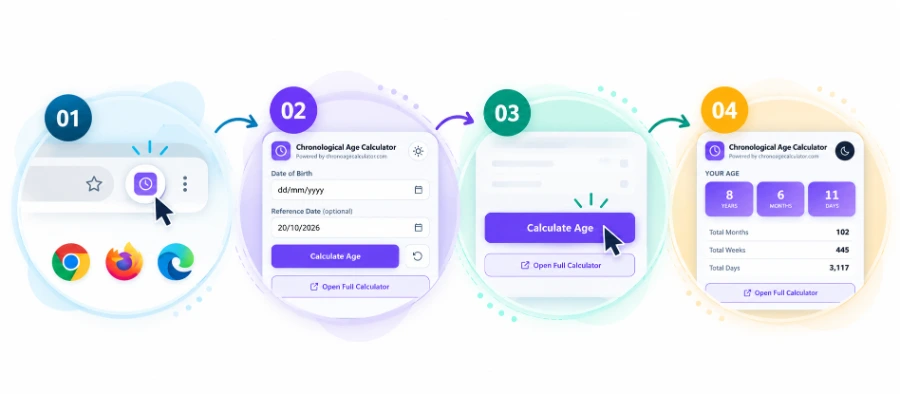
Using our Chronological Age Calculator extension is quick and straightforward. Once installed, open it directly from your browser toolbar to access the calculator popup. Enter your date of birth, choose a reference date if needed, and click Calculate Age to view your results. You can also switch between light and dark mode for a viewing experience that suits your preference. Follow the steps below to get started.
Open the Extension
Open the browser where you installed the Chronological Age Calculator extension. Find its icon in the toolbar or open your browser’s Extensions menu if the icon is hidden.
Enter Your Dates
In the popup, enter your date of birth. You can also select a reference date if you want to calculate your age on a specific day.
Calculate Your Age
Click the Calculate Age button to process the dates you entered. If needed, use the reset button to clear the dates and start again.
View Your Results
Review your chronological age in years, months, and days. Depending on the displayed results, you may also see totals such as months, weeks, and days.
Use Our Amazon App
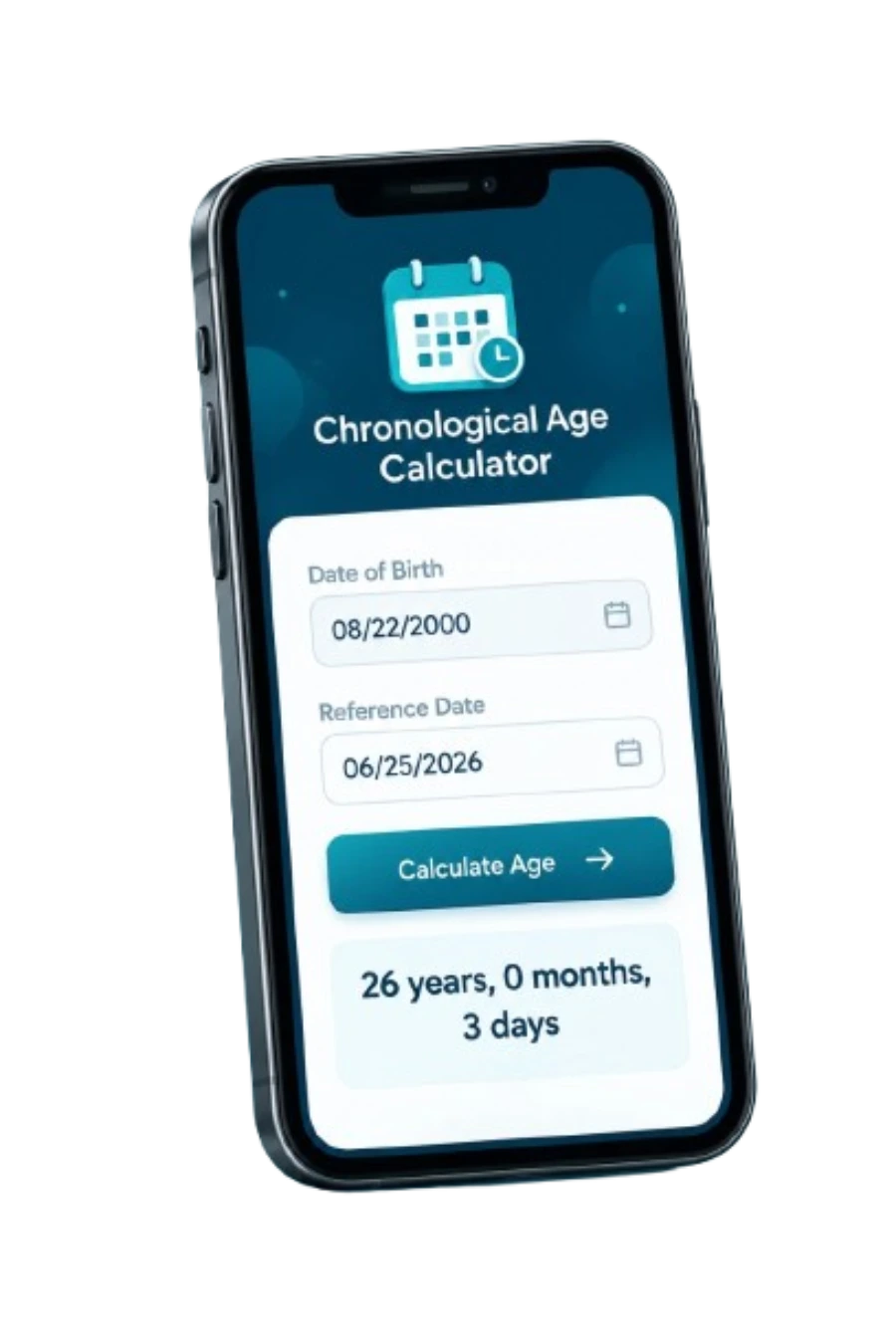
Need to calculate chronological age on your Android device? Our Chronological Age Calculator app is available on the Amazon Appstore, giving you another convenient way to calculate age in years, months, and days. Explore the app’s features, enter your dates, and view your results whenever you need them. Get the app below and keep age calculations within easy reach.
Take Your Age Calculator with You
Calculate chronological age on your Android device with our free app, available on the Amazon Appstore.

Chronological Age Calculator
By Learnera
Free on Amazon Appstore
- Calculate age in years, months, and days.
- Use the test-manual date format (Y;M;D).
- Explore additional age totals and calculations.
- Copy and print results, where supported.
Download Our Excel or Google Sheets For Bulk Chronological Age Calculation
Need a convenient way to calculate chronological age without opening an online tool every time? Use our free Excel and Google Sheets templates to calculate age in years, months, and days. Enter a date of birth, choose a reference date, and let the spreadsheet do the calculations for you. Download the Excel template or create your own copy in Google Sheets to get started.
Prefer to build your own spreadsheet? Follow our step by step guide to calculating chronological age in Excel.

Excel Age Calculator Template
Download our ready-to-use Excel spreadsheet to calculate chronological age on your computer. Enter a date of birth and reference date to calculate age automatically.
- Calculate age in years, months, and days
- Enter a custom reference date
- Automatic formula-based calculations
- Simple instructions included in the file

Google Sheets Age Calculator
Prefer working online? Use our Google Sheets template to calculate chronological age in your browser. Make your own copy and enter your dates to get started.
- Use the spreadsheet in your browser
- Enter a date of birth and reference date
- Calculate age in years, months, and days
- Save your own copy in Google Drive
How To Use The Templates
How to Use the Excel Template
- Download the file. Click the Download Excel Template button and save the .xlsx file to your computer.
- Open in Excel. Find the downloaded file and open it using Microsoft Excel.
- Enter your date of birth. Type your birth date into the designated date of birth field.
- Choose a reference date. Use today’s date or enter a different date to calculate your age as of that day.
- View your results. The spreadsheet uses formulas to calculate your age in completed years, months, and days.
How to Use the Google Sheets Template
- Open the template. Click the Use Google Sheets Template button on this page.
- Make your own copy. When prompted, sign in to your Google account if needed, then click Make a copy.
- Find your copy. Your personal spreadsheet will open, and a copy will be saved in your Google Drive.
- Enter your date of birth. Add your birth date in the designated date of birth field.
- Set the reference date. Use the current date or enter a custom date for your calculation.
- View your results. The spreadsheet calculates your age in completed years, months, and days using its formulas.
Get Our Other Free Online Age Tools
Calculate age quickly and easily with our free online tools. Whether you need to find an exact chronological age, check a student’s age for school planning, or explore our alternative calculator, we have a tool to help. Choose the calculator that matches your needs and get started in just a few clicks. No complicated steps, simply select a tool and enter the required dates.
Chronological Age Calculator
Calculate exact age in years, months, and days using a date of birth and reference date.
Calculate Your AgeStudent Age Calculator
Check a student’s age for school admission and grade placement planning.
Check Student AgeBirthday Countdown Calculator
Find out how much time remains until your next birthday.
Try Birthday CountdownRead Our Guide
Want to learn more about chronological age? Read our detailed guides on chronological age, its uses, examples and how to calculate it manually using maths yourself or using Excel or Google Sheets. We also explain the differences between chronological age and other age measurements in simple, easy-to-understand language.

6 Types of Ages Explained: Chronological, Social & More

Chronological Age: Meaning, Importance, Uses & Example
Chronological Age VS Mental Age





Frequently Asked Questions
How do I use the Excel chronological age calculator template?
Download the Excel template and open it in a compatible spreadsheet application. Enter the required dates in the designated cells, and the template will calculate the result automatically.
How do I make a copy of the Google Sheets template?
Click the Google Sheets template button and select Make a copy. The template will be saved to your Google Drive, where you can enter your own dates and use your personal copy.
How do I install a chronological age calculator browser extension?
Open the extension’s official listing in the relevant browser store. Review its features, permissions, and compatibility before installing it, then follow the extension’s instructions to get started.
Which should I choose: an online tool, browser extension, or spreadsheet template?
An online tool is convenient for quick calculations, a browser extension may provide easier access within a supported browser, and a spreadsheet template is useful when you prefer working with your own editable copy.